Project 3: File System
Introduction
The goal for this assignment is to design and implement a completely new file system that we call PiFS. This file system will live in a designated new partition that you create on the Raspberry Pi’s SD card. To implement the file system, we will use FUSE, a tool that allows us to run file system code as a regular program (in userspace). When a FUSE program is run, it creates a file system at a mount point provided by the user, and then makes its virtual file system appear within that mount point. All operations performed within the subdirectories and files within that mount point are passed, by the kernel, onto the FUSE program to handle.
Creating a new partition
The program parted allows you to modify partitions of storage devices in linux. Start it from the command line
on the Raspberry Pi using:
sudo parted
To see information about the current partitions, within parted type:
print
If you configured the SD card with the Raspberry Pi Imager, you should see two partitions, one in with a fat32 file system, which contains your boot partition, and one with a ext4 file system, which contains your root filesystem. You can see the start and end positions of each partition and you will see that the first roughly 8 MB of the SD card are unused. Create a new partition in the free space by typing the following in parted:
mkpart primary 1MB 5MB
This will create a new raw partition (no file system) of 4MB size. This shall be enough for our file system prototype. Exit parted by typing
quit
The new partition should appear in your devices. To verify, run:
ls /dev | grep mmcblk0
You should see mmcblk0 (the SD card) and ...p1, ...p2, ...p3 for the three partitions.
Reading and writing to your new partition requires superuser priviledges. For simplicity, we will allow everyone
to read and write to it:
sudo chmod a+rw /dev/mmcblk0p3
FUSE
FUSE (Filesystem in USErspace) is an easy way to create a file system running in userspace for Linux. It is a software interface for Unix and Unix-like computer operating systems that lets non-privileged users create their own file systems without editing kernel code.
There are many difficulties in writing a file system, two of the biggest are:
- A large, complex API
- File system lives in kernel space (hard to debug, easy to crash the machine)
FUSE fixes #1 by providing a simpler, more uniform API. For example, in FUSE all operations take a full, absolute path (a path is absolute if it starts with “/”). There is no notion of relative paths. FUSE fixes #2 by running your file system code in user space rather than in kernel space. The architecture of FUSE is found in the figure below.
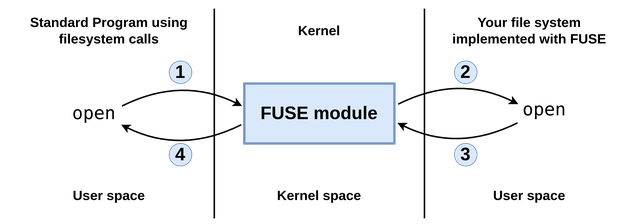
The following gives an example of how the interaction between user, kernel, and FUSE takes place:
- A program, such as ls or mkdir makes a system call to a file system routine. For example, open(“/test/fuse/file1.txt”). This call is handled by the kernel.
- If this file is in a FUSE volume, the kernel passes it on to the FUSE kernel module, which then passes it on to the implementation of that file system (this is the portion you are to implement in this project).
- The implementation of open then refers to the actual data structures that represent the file system and returns a file handle. It is open’s job to take a concrete view of data (bits stored on the storage device) and present an abstract view (a hierarchically organized file system).
- The kernel returns the result of the open function to the program that originally made the call.
FUSE API
| File | Directory | |
|---|---|---|
| create | mknod | mkdir |
| remove | unlink | rmdir |
| read | read | readdir |
| write | write | |
| misc | open, close, truncate |
Also, there is a getattr function, which applies to both files and directories. getattr returns various statistics, such as file size, or the number of files in a directory. This is heavily used, and should be one of the first things to implement.
You can find more information about the data structures of FUSE in the file /usr/include/fuse/fuse_common.h and the interface of the functions in /usr/include/fuse/fuse.h. The latest version of fuse.h have some usefull documentation as well: fuse.h. But keep in mind it may be a newer version than in your packet repository.
Taking FUSE for a test run
FUSE is already installed in the Linux distribution used on the Raspberry Pi, but to build a project with it, you need to install the headers by calling:
sudo apt install libfuse-dev
Create a new folder for your project:
mkdir ~/project3
cd ~/project3
Now download the following files:
wget https://larsrohwedder.com/teaching/dm510-26/projects/FUSE/pifs.c
wget https://larsrohwedder.com/teaching/dm510-26/projects/FUSE/Makefile
Create the executable pifs by running make. The following sample session shows how this very simple sample file system is mounted (via the program pifs) and unmounted (via the command fusermount -u).
mkdir mountpoint
chmod 755 mountpoint
./dm510fs mountpoint
cd mountpoint
ls
cd ..
fusermount -u mountpoint
You should use the sample file system as a base for your implementation of your filesystem.
If you see the code of pifs.c you see several printf statements, which in the previous session were not shown in the terminal session (and not found in any of the logs under /var/log/). To see these, use the -f flag (i.e. ./pifs -f mountpoint), which keeps FUSE in the foreground. You then need another terminal to interact with your filesystem.
The Task and Requirements
The filesystem you will implement is simplified and makes many shortcuts, compared to a real usable filesystem. In the description below, a lot of details are left out. You have to decide for yourself what is appropriate and what to do, and document the choices in the comments of your source code. You may also implement more advanced features, such as the ones you learned in the lectures about, at your own choice.
To get started quickly, you might want to ignore the actual partition you created and simply allocate a section of memory with malloc and store your entire filesystem in there. You can later adapt your code to keep the filesystem in the partition.
The inode
The inode (or FCB) is the central data structure in a file system. The first thing you should do is to consider what your inode should contain.
You are allowed to restrict the length of a filesystem path and the name of a file, and you can keep this in an array of a fixed length. The same goes for the data of the files, where you can restrict the maximum length of a file to what can be in a fixed length array in the inode.
With these limitations, your inode can have a fixed size, which makes it easy to use a struct for it. You can consider your filesystem as an array of inodes, one for each file or directory. The inode then contains both data and metadata of the directory or file.
Functionality
Your file system should implement the following basic features of a file system using appropriate APIs from FUSE.
- Directories: List, create, and delete files. Create and delete directories. You can omit rename and link. You are as mentioned above allowed to restrict the length of filenames.
- Files: Open, close. Sequential read/write of streams of bytes.
- Inodes: Size, access and modification time stamps. You can omit owner, permissions, reference count, etc.
Remember to document your choices using comments in the source code.
Persistence
The actual file system should be on the new partition on your SD card, not just in main memory.
It is ok if you read the data from the partition completely into memory when the filesystem is mounted, and write it back when unmounted. Normally, a file system would be so large that you usually would not want to keep it entirely in main memory, but since our partition is only 4MB large, this would be fine here.
Reading and writing to the partition works in the same way as reading and writing to files.
For this, open /dev/mmcblk0p3.
You could also map the data on /dev/mmcblk0p3 to your address space with mmap and directly work on it, but this is not a requirement.
Before mounting the partition for the first time, you need to initialize it, since the raw storage may contain
arbitrary data. This is called formatting. Write a separate user program for initializing the partition
with an empty PiFs file system.
Common problems
There are several common problems that plague programmers new to FUSE. This is a partial list:
- Error: Transport endpoint not connected: You need to do the fusermount even if your program crashes or you abort it. Otherwise you’ll get a confusing “Transport endpoint not connected” message the next time you try to mount the test system.
- Multithreading: By default, Fuse is multithreaded. That’s handy for production filesystems, because it lets client (or file access) A proceed even if client B is hung up. But multithreading introduces the possibility of race conditions, and makes debugging harder. You can run FUSE with the -s switch to avoid this problem.
- getattr: Fuse calls getattr like crazy. Implement it first, or nothing will work.
- Truncate: Unless you’re writing a read-only filesystem, you need to implement the truncate system call to make writes work correctly.
- Working directory: When it starts, Fuse changes its working directory to “/”. That will probably break any code that uses relative pathnames. To make matters worse, the
chdiris suppressed when you run with the-fswitch, so your code might appear to work fine under the debugger. To avoid the problem, either (a) use absolute pathnames, or (b) record your current working directory by callingget_current_dir_namebefore you invokefuse_main, and then convert relative pathnames into corresponding absolute ones. Obviously, (b) is the preferred approach. - Printf: Your printf/fprintf debugging code will only work if you run with the
-fswitch. Otherwise, Fuse disconnects stdout and stderr. - Unimplemented functions: It is very tempting to just leave functions undefined if your filesystem doesn’t need them, or if you just haven’t gotten around to writing them yet. Don’t. If a function isn’t listed in your fuse_operations struct, Fuse will silently generate a failure when it is called, and you’ll never find out that you need to write it. Instead, write every unimplemented function as a stub that prints a message to stderr and returns an error code. When you see the message, you’ll know what extra functions you need to write.
Submission
Submit via itslearning the following:
- Source code of the FUSE file system
- Source code of the formatting program
- Other potential source code (testing, etc.)
- A video recording (from your phone or screen capture) that demonstrates the functionality of your file system.
- A pdf with answers to the questionaire below and possibly appendices.
Questionaire:
- Did you manage to create a new partition on the SD card?
- Did you manage to compile the initial FUSE program and run it?
- Did you manage to implement the basic functionality of a file system as described above?
- Did you manage to implement persistence on the new partition?
If your answer is no to some of these questions, you may include explanation on which problems you ran into. It is intentional that there is no excessive report on the project. All design decisions that you made should be documented in the source code itself.
Assessment:
The project will be graded based on the following:
- Functionality: Did you implement the required functionality and is the implementation correct?
- Style: Is the programming style appropriate and is the code well documented?
- Tests: Are you testing all aspects of the file system?